
Survival · Roguelike · 3D

PokeBonk

Three starters. Two minutes. One stone golem to beat.

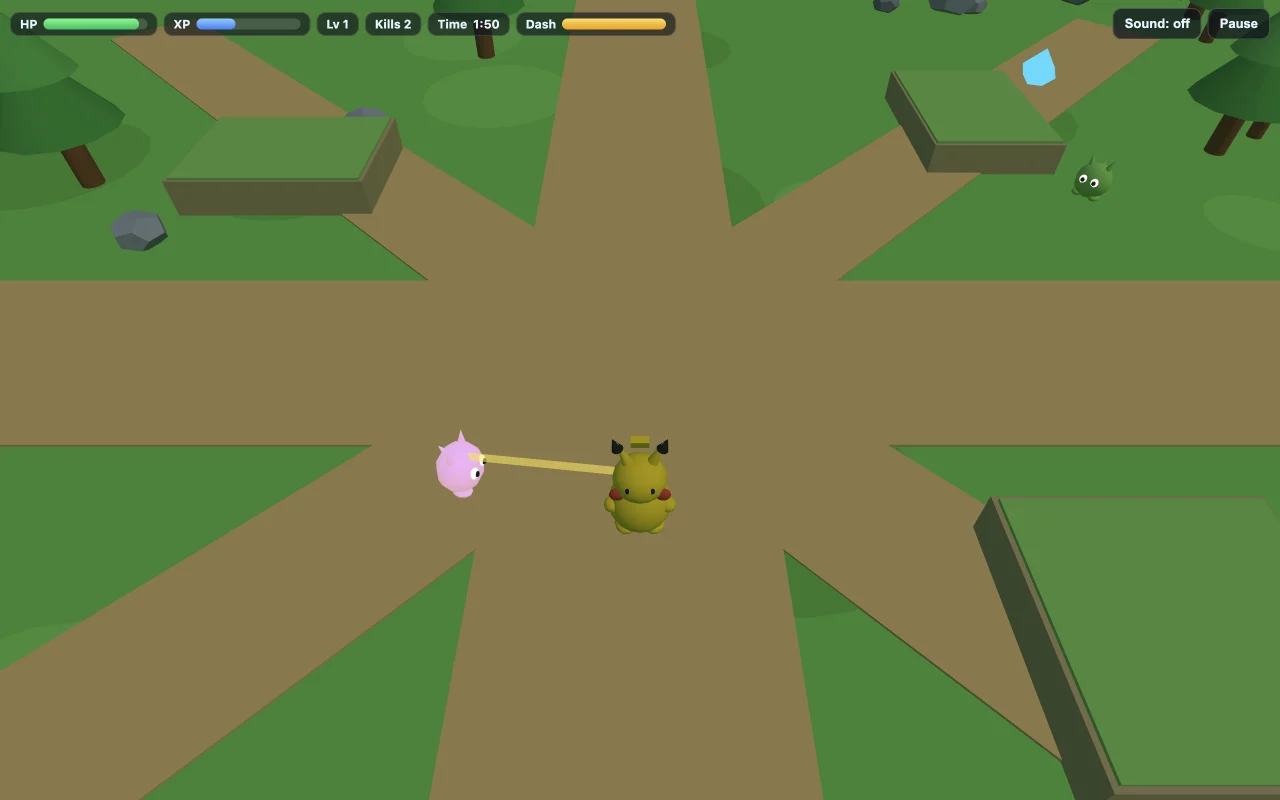
PokeBonk gameplay on OpenGame: Pikachu moves through a 3D meadow while nearby enemies approach and health, XP and dash meters show the current run.

What is PokeBonk?

PokeBonk: Pocket Survivor on OpenGame is a 3D Pokemon survival fan game you can play in your browser. Choose Pikachu, Charmander or Squirtle, steer around approaching enemies and let your starter attack automatically. Collect XP gems, pick upgrades and defeat the stone golem before the two-minute timer expires. The short run rewards movement and build choices rather than turn-based battles.

Choose your starter
3 Pokemon
Run time limit
2 minutes
Your objective
Defeat the golem

This is an independent OpenGame fan adaptation inspired by PokeBonk, with its own code, geometric fan art and compact single-player rules. It is separate from the reference game at pokebonk.com and its developer, and is not affiliated with Nintendo or The Pokémon Company.

Click or tap inside the game to begin using its controls.

Published

Use a keyboard for movement on desktop. On a phone, use the direction pad plus Jump and Dash; you can move and dash together. Open the full-page player if the embedded controls feel cramped. The 3D game needs a browser with WebGL available.

01Learn the controls

Controls for PokeBonk

Controls for PokeBonk
ActionWhat to use
Choose and startSelect Pikachu, Charmander or Squirtle on the title screen, then press Start. Each starter has a different automatic attack and passive.
MoveWASD or arrow keys on desktop. On a phone, use the direction pad in the lower-left corner. Keep moving around enemies rather than stopping to attack.
AttackAutomatic when a target is in range. There is no fire button to hold. Your position determines which enemies your starter can reach.
Jump and dashSpace to jump and Shift to dash, or the on-screen Jump and Dash buttons. Watch the Dash meter before relying on another burst.
Choose an upgradeClick or tap one of the three upgrade cards after leveling up. The action and run timer pause while the choice is open.
Pause or restartP, Escape or Pause opens the pause menu; Resume continues the current run. After victory or defeat, Play Again starts a fresh attempt.

02Your first run

How do you play PokeBonk?

  1. Learn one starter before switching

    Pikachu gives you extra movement speed and chain lightning, making it a useful first choice for learning a route. Charmander sends out ember projectiles and slowly regenerates health. Squirtle uses a water pulse and takes less damage. Select the attack style you want to practice, then start the run.

  2. Move in a loop and collect the dropped XP

    Let the first enemies follow you, then turn back through the gems left by defeated targets. Running in one direction forever can leave your experience behind. Make a wide loop with an exit, collect reachable gems and move away before the crowd closes the gap.

  3. Use level-ups to prepare for the boss

    Read the card values before choosing. Power Up raises damage, Quick Strikes increases attack frequency and Gem Magnet expands pickup reach. Choose a survival upgrade if reaching the next fight is the immediate problem. The menu pauses the action, so you have time to compare the three cards.

  4. Find the golem when it arrives

    The boss arrives after 90 seconds of play, leaving 30 seconds on the run clock. Follow its direction marker if it is off screen, move into attack range and watch the numeric boss health. Continue dodging enemies and the boss warning instead of standing still to deal damage.

  5. Finish the boss before time runs out

    Winning requires reducing the golem’s health to zero. Surviving until the two-minute limit with the boss still alive is a loss. The result screen shows the actual run time, kills, level and upgrades. Choose Play Again to try a different route or starter.

Which PokeBonk starter should you choose?

All three starters are available immediately in this OpenGame edition. Compare their attack and passive, then choose the movement style you want to learn.

Which PokeBonk starter should you choose?
StarterAttack and passiveHow to approach a run
PikachuChain Spark; +10% movement speed.Circle the swarm, gather XP and use the extra speed to reopen a safe route. Chain lightning can hit nearby targets.
CharmanderEmber projectiles; slow health regeneration.Give projectiles room to reach enemies. Regeneration helps between hits, but repeated contact can overwhelm it.
SquirtleWater pulses; 15% damage reduction.Let approaching enemies enter pulse range while keeping an exit open. Damage reduction gives some room for mistakes; it does not prevent contact damage.

These are the three starters in the game above. Rosters, evolutions and multiplayer features described by other PokeBonk projects do not describe this edition.

PokeBonk gameplay on OpenGame: Pikachu moves through a 3D meadow while nearby enemies approach and health, XP and dash meters show the current run.
Actual OpenGame gameplay captured on October 17, 2026, during the opening enemy wave with Pikachu. The guide describes this three-starter fan adaptation.

Understand the game

How do XP, upgrades and the PokeBonk boss work?

The run has two jobs: build enough strength during the enemy waves, then bring that strength into range of the boss. A large kill count alone does not complete the challenge.

Experience must be picked up

Defeated enemies leave gems on the ground. Collect them to fill the XP bar and reach the next level. Gem Magnet helps you collect from farther away, but you still need a route through the drops. Do not trade most of your health for one isolated gem.

Upgrade cards change actual stats

Damage, attack frequency, movement speed and pickup reach affect the current run. Read the old and new values on the card. In our Pikachu playtest, Power Up increased damage from 12 to 15, and Gem Magnet increased pickup reach from 2.6 to 4.

The boss has a separate health bar

The stone golem starts with 500 health. Your starter’s normal automatic attack can damage it when you are in range. Use the direction marker to locate it and the numeric health display to check that attacks are connecting. Avoid spending the last seconds fighting ordinary enemies far from the boss.

Pause and upgrade choices stop the clock

Pause or a level-up choice stops the simulation while you read. Resume or choose a card to continue. In our full Pikachu playtest, the boss reached zero health at 115.6 seconds, with 4.4 seconds left. That is one observed result, not a guaranteed clear time or an optimal build.

03Make the next run count

How can you improve at PokeBonk?

Make your XP route repeatable

Start with a broad loop through open ground. Watch where enemies fall and return through their gems when the path clears. If your level is low as the boss approaches, check whether you are leaving drops behind before assuming you need more damage.

Balance collection and damage

An early pickup upgrade can help you earn later cards, while damage and attack-speed upgrades help finish enemies and the boss. Our winning Pikachu run reached level 6 with five upgrades, including Gem Magnet, Quick Strikes and Power Up. Different card offers can call for a different choice.

Save a dash for the exit you can see

Dash toward an open patch of ground rather than into the densest part of the swarm. Check its cooldown before committing to a narrow gap. Jump is another movement tool, but staying clear of contact damage is more reliable than remaining surrounded.

Change priorities at 90 seconds

When the golem appears, stop taking long detours for small XP drops. Locate the boss, approach through the safer side and keep it within your attack’s reach. Watch both your health and the boss health: if only yours is falling, move to create a better angle.

Use a loss to change one decision

An early defeat suggests a movement or survival problem; a timeout with a healthy boss suggests weak damage, late arrival or poor range. Change one route or upgrade priority on your next attempt so you can see what helped. Play Again resets the run rather than preserving that attempt’s upgrades.

04Before you play again

Questions about PokeBonk

Can I play PokeBonk online without downloading it?

Yes. The OpenGame fan adaptation runs in the browser player on this page, with no game download or account required to play. Choose a starter and press Start, or open the full-page player for more space.

Is this the original PokeBonk game?

This page hosts PokeBonk: Pocket Survivor, an independent OpenGame fan adaptation inspired by the reference game at pokebonk.com. It has three starters and a two-minute single-player challenge. It is separate from that game and its developer, and is not an official Pokémon release.

Which Pokemon can I play as?

Pikachu, Charmander and Squirtle are available from the start. Pikachu has chain lightning and extra movement speed, Charmander has ember projectiles and slow health regeneration, and Squirtle has water pulses and 15% damage reduction.

How do I attack in PokeBonk?

Your starter attacks automatically when an enemy is in range. Focus on movement, avoiding contact and collecting XP. If the boss health is not falling, follow its marker and get close enough for your chosen attack to reach it.

How do I beat the stone golem boss?

Collect XP and choose useful upgrades during the first 90 seconds, then move into attack range when the boss appears. Dodge its warning and ordinary enemies while your attacks reduce its 500 health. You have until 120 seconds to defeat it; simply surviving to the timer does not win.

Can I play PokeBonk on a phone?

This edition includes a direction pad and Jump, Dash and Pause controls. Move with the pad and use the action buttons with another finger. Open the full-page player if the embedded controls feel cramped. Use a browser with WebGL available for the 3D game.

Does this PokeBonk edition have multiplayer or permanent unlocks?

The game on this page is single player. The current run’s level and upgrade cards reset when you choose Play Again. This edition does not provide co-op rooms, an account-based Pokemon collection or a shared leaderboard.

Why are the game controls or timer not responding?

Click or tap inside the player, choose a starter and press Start. If a pause screen or upgrade choice is open, resume or choose a card; both intentionally stop the run timer. You can also open the full-page player. The 3D game needs a browser with WebGL available.

About this PokeBonk guide

Guide by OpenGame. Content reviewed .

The controls and rules describe the published game on this page. Screenshots show the game at the stage noted in each caption. Later game revisions may change its behavior.

Learn how OpenGame works, or contact support to report a guide correction.