
FPS · 3D · Single player

Counter Flame

Peek from cover. Read the amber warning. Make your next shot count.

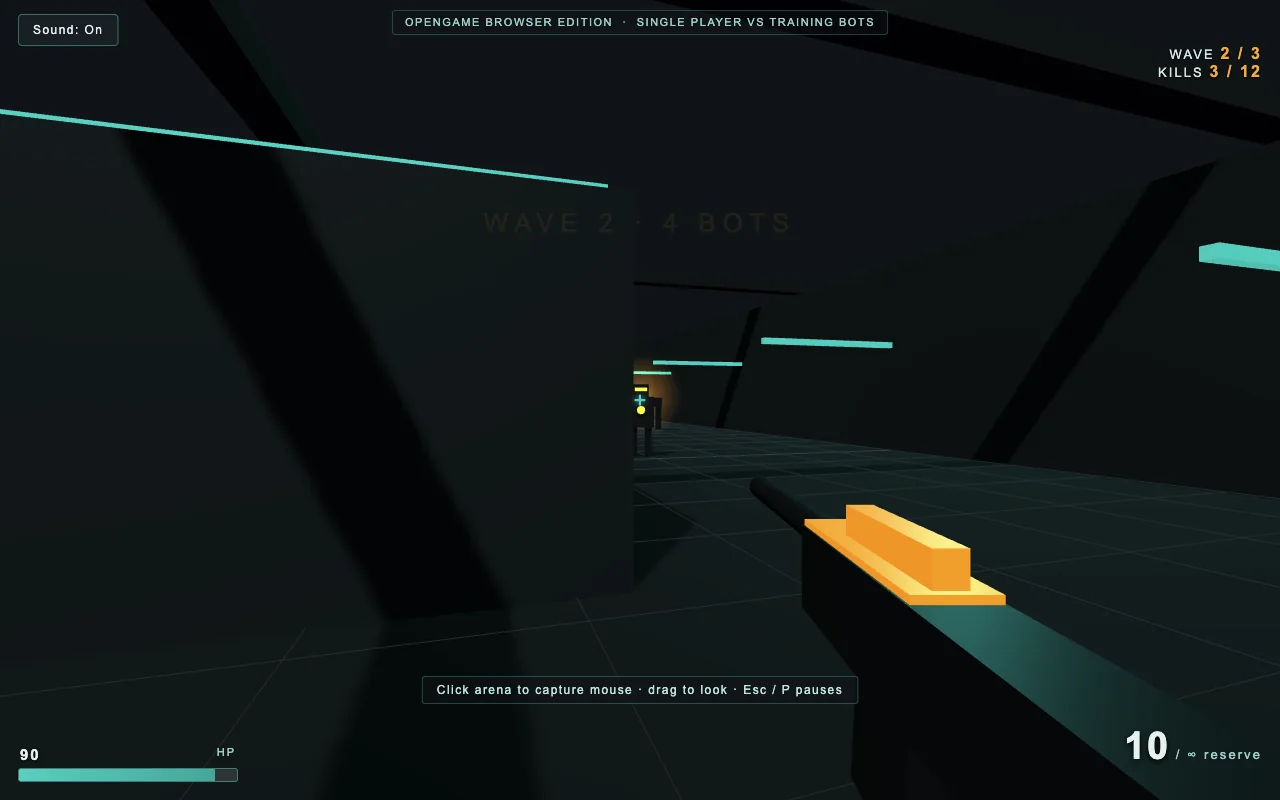
Counter Flame browser FPS gameplay: an original rifle aims past a cover block at an amber-lit training bot in a teal industrial arena.

What is Counter Flame?

Counter Flame on OpenGame is a single-player first-person shooter set in an original industrial training arena. Move between cover, line up shots on amber-lit robots and clear three waves. A short magazine makes each peek a decision: stay exposed to finish a target, or fall back and reload before the next warning light turns into incoming fire.

Your objective
Clear 3 waves
Your opponents
Training bots
Your weapon
20-round rifle

OpenGame browser edition with an original arena and training bots. This independent game is not the CounterFlame mobile app and does not connect to its multiplayer servers.

Click or tap inside the game to begin using its controls.

Published

Desktop gives you the most room for aiming: click inside the player, move with WASD and aim with the mouse. On a phone, use landscape and the separate movement, look and action controls. Open the full-page player when the embedded view feels cramped.

01Learn the controls

Controls for Counter Flame

Controls for Counter Flame
ActionWhat to use
Move and strafeWASD or arrow keys. Forward follows your view; left and right strafe around cover. On touch, use the movement pad on the left.
AimMove the mouse after starting the game. If mouse capture is unavailable, drag in the play area. On touch, drag in the look area on the right.
FireLeft mouse button or the on-screen Fire control. Put the crosshair on a visible robot; cover blocks shots.
ReloadR or Reload. The magazine holds 20 rounds, and spare magazines are unlimited. Move behind cover before you reload.
Pause and resumeP, Escape or Pause. Use Resume to return to the current fight.
Start againUse Retry after defeat or Play again after victory. New run returns to the title screen; choose Start to begin a fresh attempt.

02Your first run

How do you play Counter Flame?

  1. Start with an escape route

    Read the start screen and begin the run. Use the safe opening countdown to locate the nearest cover and an open lane. You control one player; every opponent is a training bot. Keep a route back behind cover instead of walking into the middle of the arena.

  2. Aim at a visible robot

    Peek around the edge of a block and bring the crosshair onto a bot. Watch the hit feedback rather than firing through walls. Once a target disappears behind cover, reposition until you have a clear angle again.

  3. Respect the amber warning

    Bots signal before firing. When a warning appears, break line of sight with a solid block or wall. Use that protected moment to reload, then return from a different angle. Cover works for both sides, so a hidden enemy also needs a new approach.

  4. Clear the last wave

    Defeat the remaining bots to advance. Later waves bring more targets into the same arena. Keep checking health, ammunition and the wave counter. Clearing the third wave reaches victory; losing all health ends the run and offers a fresh attempt.

Counter Flame online, APK and mobile: what is on this page?

These are common ways to look for Counter Flame. The playable game here is the OpenGame browser edition, with its own rules and arena.

Counter Flame online, APK and mobile: what is on this page?
What you wantAvailable hereWhat to expect
Counter Flame onlinePlay directly in the browserA solo FPS against training bots; no matchmaking.
Counter Flame mobileLandscape touch controlsUse the browser player on a phone; this is a separate game from the mobile app.
Counter Flame APK or iOS downloadNo installer requiredThis page does not distribute the mobile app or an APK.
Counter Flame controls and tipsGuide to the game aboveMovement, aiming, cover, reloads and wave progression.

Mobile-app maps, modes, accounts and version numbers do not describe this browser edition.

Counter Flame browser FPS gameplay: an original rifle aims past a cover block at an amber-lit training bot in a teal industrial arena.
Actual OpenGame browser gameplay captured on October 15, 2026, during wave two. The HUD shows three bots defeated, 90 health and 10 rounds remaining.

Understand the game

How do cover, magazines and bot warnings work?

The challenge comes from deciding when to expose yourself. Aim matters, but a protected reload and a clear retreat can be more useful than another burst in the open.

A wall is protection for both sides

Shots need a clear line to their target. You cannot damage a robot through a cover block, and a robot cannot shoot you through one. Move around an edge until the target is visible instead of spending the magazine on an obstruction.

Reloading costs time, not spare magazines

You have unlimited spare ammunition, but the rifle still needs time to reload. The 20-round magazine is the resource to manage during an exchange. Begin the reload somewhere protected, then re-enter the lane with enough ammunition to finish a target.

Warnings give you a decision window

A bot stops and telegraphs its attack before firing. Use that signal to retreat, change your angle or finish a nearly defeated target. Staying visible throughout every warning leaves your health doing the work that cover could have done.

Three waves make one complete run

The arena stays compact while the number of opponents increases. Clearing a wave advances the challenge; clearing the third wins. A fresh run begins from the first wave with restored player state.

03Make the next run count

How can you improve at Counter Flame?

Fight one lane at a time

Choose cover that hides you from several directions while leaving one useful firing angle. Exposing yourself to every bot makes even accurate shooting expensive. Reposition when the active targets are no longer in your lane.

Finish a target before changing focus

Several damaged bots can still threaten you. When it is safe, finish the robot you have already hit before turning to another. Break off when a warning or an empty magazine makes the exchange unsafe.

Check ammunition before you peek

Use the HUD while you are protected. A nearly empty magazine is a reason to reload before entering the next lane. Unlimited spare magazines let you prepare for the encounter without hunting for pickups.

Use a retry to change one habit

If a run ends early, choose a different first cover position or retreat sooner when a bot warns. A repeatable opening makes it easier to see which decision kept you alive longer. Keep the movement small until you are comfortable aiming while strafing.

04Before you play again

Questions about Counter Flame

Can I play Counter Flame online without a download?

Yes. The OpenGame browser edition runs in the player above. Start the game here or open the full-page player. You do not need to install an APK to play this separate browser game.

Is this the CounterFlame mobile app?

This is an independent OpenGame browser edition with an original arena and single-player training bots. It is not the mobile app, does not use its accounts and does not connect to its multiplayer servers.

Can I play Counter Flame with other people?

This browser edition is single player. The robots are controlled by the game, and there is no matchmaking or human team. Your objective is to survive and clear the three bot waves.

Does Counter Flame work on a phone?

The browser edition includes touch movement, a look area and action buttons. Use landscape for more room and open the full-page player if necessary. A keyboard and mouse are the easiest way to learn aiming and cover.

How do I reload, and can I run out of spare ammunition?

Press R or use Reload. The rifle has a 20-round magazine and unlimited spare magazines. Reloading takes time, so use a cover block or wall to break line of sight while you prepare the next magazine.

Why are my shots not hitting a bot?

Check that the target is visible, the crosshair is on it and the magazine is not empty or reloading. Walls and cover block shots. Move to a clear angle rather than continuing to fire into an obstruction.

Why is mouse aiming or the keyboard not responding?

Click inside the player and start or resume the game. Mouse capture requires an intentional click. If capture is unavailable, try drag-look or open the full-page player. Escape can release the mouse and pause the fight.

How do I win and start another run?

Clear all three waves without losing all your health. Choose Play again after victory or Retry after defeat for a fresh countdown. New run returns to the title screen; press Start there to begin again with 100 health, a full magazine and wave one.

About this Counter Flame guide

Guide by OpenGame. Content reviewed .

The controls and rules describe the published game on this page. Screenshots show the game at the stage noted in each caption. Later game revisions may change its behavior.

Learn how OpenGame works, or contact support to report a guide correction.