
OpenGame guide
Universal Modder Guide: Setup, Tests and Game Examples
Learn Universal Modder requirements, installation and a first-mod workflow, with a tested backup exercise, game-case limits and practical troubleshooting.
 OpenGame Team
Cover: an AI-generated concept illustration of a local modding workspace.
Universal Modder helps an AI coding agent investigate and modify a PC game on your computer. It combines agent skills, a Python CLI, optional fal asset generation, testing and packaging. You need a local game and its development tools.
This Universal Modder guide covers setup, a first-change plan and a recovery exercise we ran with disposable files on macOS. We reviewed version 0.2.0, commit 8607693, on October 5, 2026. We did not complete a PC mod or run paid generation.
What can Universal Modder actually do?
Universal Modder supplies a workflow. Your agent must still identify the engine, choose a modding route and verify changes in the game.
| Your goal | Useful starting point | What still needs verification |
|---|---|---|
| Identify a locally installed game | um scan | Exact edition, build, engine and available modding route |
| Find earlier attempts | um kb search | Whether the recorded versions match your installation |
| Prepare sprites or other assets | um sprite, optionally um fal | Dimensions, orientation, transparency and the game's import format |
| Turn a model into sprite frames | um render3d with Blender | Camera angle, headings, frame size and animation timing |
| Check a mod in a running Windows game | um win | Successful loading, visible behavior and platform compatibility |
| Protect a save or configuration folder | um backup | Correct folder, snapshot identity and recovery behavior |
Universal Modder assets still need an import check. A compiled weapon still needs a gameplay check.
Universal Modder requirements and costs
Universal Modder needs a coding agent, Git, Python 3.10+ and your local game. The package declares Pillow, NumPy and PyYAML dependencies.
Additional Universal Modder tools depend on the job:
- Windows or WSL: required for the included Windows game-control workflow.
- A compatible loader or SDK: Universal Modder does not supply every game's development environment.
- ffmpeg: needed for the documented recording and video workflow.
- Blender: needed when rendering a 3D model into sprite frames.
- A fal account and API key: needed for fal generation, not local backup checks.
Universal Modder is MIT licensed. Budget separately for the game, coding agent and optional fal calls. Check endpoint pricing and limit attempts before generating. We did not measure a finished mod's cost.
Install Universal Modder and verify the CLI
Choose one agent integration. The upstream Universal Modder README documents these commands inside Claude Code:
/plugin marketplace add rehan-remade/universal-modder
/plugin install universal-modder@universal-modder
For a project folder that a coding agent can inspect, use the clone route. This pins the source reviewed in this article:
git clone https://github.com/rehan-remade/universal-modder
cd universal-modder
git checkout 8607693be42ce02442251f05e0495f58c2b77e5d
uv tool install .
um --version
um backup --help
Install uv first if needed. Review newer revisions before updating this checkout. Open the Universal Modder clone in your agent to discover its skills; installing um alone does not configure an agent integration.
We ran the Universal Modder CLI source and checked version/help output. Plugin installation was not part of our test.
Keep fal credentials in your local environment, out of prompts, logs and packages. Add generated art after the first change works.
Plan the first Universal Modder task
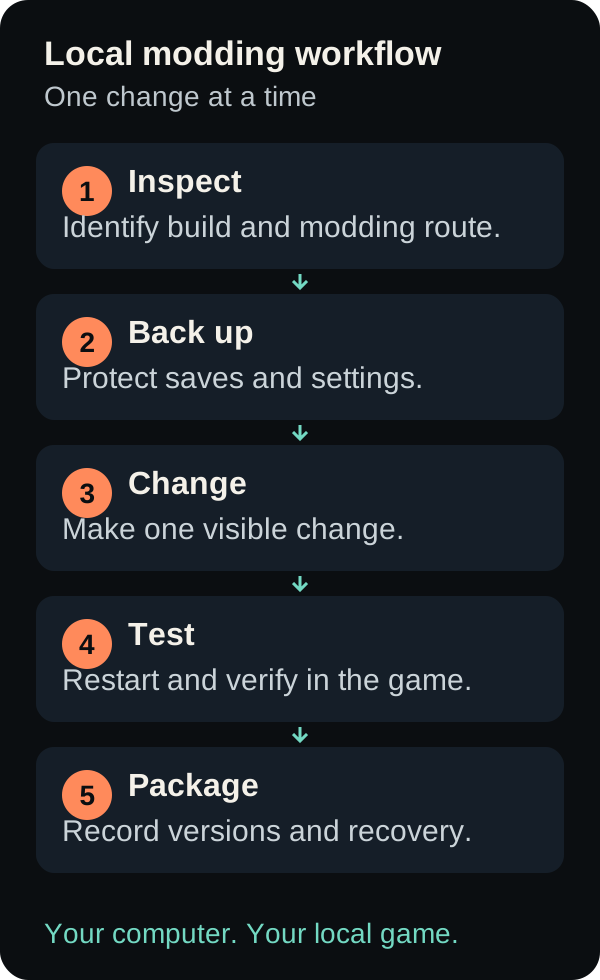
Workflow illustration. Each change still needs an in-game check.
Choose one visible change in a supported offline environment: an item name, stat or original sprite. Search before editing:
um kb search "Terraria"
um scan --list
um scan "C:\Games\YourGame" --json
Replace the path with your installation. Universal Modder suggests routes, without guaranteeing compatibility. Pass the folder explicitly if automatic discovery fails.
Use this starter request with Universal Modder. Fill in the game, version and desired change:
Help me plan one small mod for a game I own.
Game and exact build: [fill in]
Operating system and installation folder: [fill in]
Desired change: [one observable behavior]

First inspect the existing field notes and installation. Report the
engine, a supported modding route, required loader versions and the
save/configuration folders that need protection. Do not edit yet.

Propose the smallest change, the files it will touch, a backup and
recovery plan, and a test that distinguishes success from failure.
Wait for my approval before modifying the installation or driving
my desktop. Use a supported offline or private test environment.
For your first Universal Modder change, define success: “The item has the new name after restarting; removing the mod restores the original.” Keep the test result, build log and versions.
A reproducible Universal Modder backup exercise
Our Universal Modder test used temporary settings.txt and world.txt files and an isolated UM_HOME directory. It tested filesystem recovery, not a working game mod.
Use Bash on macOS or WSL for this exercise. Start a fresh terminal and isolate Universal Modder's backup storage:
lab_dir="$(mktemp -d)"
export UM_HOME="$lab_dir/um-state"
mkdir "$lab_dir/demo-save"
cd "$lab_dir"
Create settings.txt and world.txt inside demo-save, with recognizable text. Keep using this terminal:
um backup create ./demo-save --name first-mod-demo
um backup list first-mod-demo
Copy the ZIP path printed by create into snapshot_zip below. This pins the recovery point instead of selecting whichever snapshot is newest. Change settings.txt, delete the disposable world.txt, and add extra.txt:
snapshot_zip="PASTE_THE_ZIP_PATH_FROM_CREATE"
um backup diff first-mod-demo ./demo-save --snapshot "$snapshot_zip"
um backup restore first-mod-demo --snapshot "$snapshot_zip"
Universal Modder reports restore changes without applying them unless you add --yes. Check the Universal Modder folder and snapshot, then run:
um backup restore first-mod-demo --snapshot "$snapshot_zip" --yes
Our Universal Modder test produced these results:
| Check | Observed result |
|---|---|
| Detect a changed, removed and added file | All three were reported in the correct categories |
| Restore without confirmation | No file content changed; the command exited without applying it |
| Restore the two original files | The original text returned and the deleted file reappeared |
| Keep the newly added file | extra.txt remained after the default restore |
| Preserve the state before restoring | An additional pre-restore snapshot was created |
Request --clean in the disposable test | The newly added file was removed |
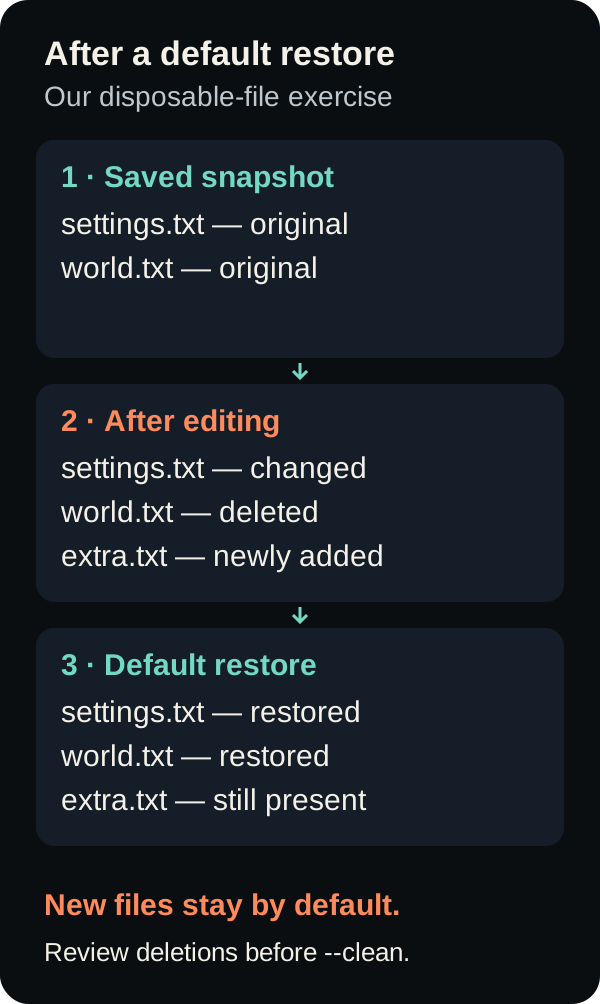
Recovery diagram based on our disposable-file test.
In Universal Modder, default restore keeps newly added files. Restoring older files may therefore leave part of a mod installed. Inspect the diff and loader state. Review the deletion list before using --clean, and keep independent backups of valuable saves.
What Universal Modder examples prove—and what they do not
The Universal Modder index has 16 game field notes with differing statuses. They are contributor reports tied to specific versions, not a compatibility list.
Universal Modder example: Terraria and the loader API
The Universal Modder Fal Arsenal note describes weapons, enemies and a boss built through tModLoader. It reports a Terraria 1.4.4.9 environment with a particular tModLoader build. The contributors checked loading, sprite appearance and scripted scenes; they explicitly did not verify multiplayer.
This Universal Modder example favors an established loader API. Its destructive demonstrations also required restoring a pristine world between takes. Check the recorded versions before reproducing it.
Universal Modder example: an incomplete Wukong result
A second Universal Modder note remains in progress. Its capture integration loaded, but the sampled depth image was flat, preventing the intended depth-correct composition through that route. The contributor also states that gameplay depth and the Minecraft side were not verified.
For Universal Modder projects, test the required engine capability early. Loading a tool does not prove the proposed feature works.
The reviewed index contains no ACE COMBAT field note. OpenGame's browser homage is not evidence that Universal Modder supports a commercial ACE COMBAT game.
Troubleshoot Universal Modder in the right order
| Symptom | First check | Useful next action |
|---|---|---|
um is not found | Tool installation and terminal PATH | Reopen the terminal, then check um --version before involving the agent |
| CLI works but the agent has no modding workflow | Plugin/skill discovery and working directory | Confirm the chosen integration or start inside the repository clone |
| Scan does not find the game | Actual install location and edition | Pass the folder explicitly; do not treat a name match as version evidence |
| Asset generation fails | fal credentials, endpoint and account status | Inspect the error before retrying; avoid an unbounded paid retry loop |
| The mod builds but nothing changes | Loader log, enabled-mod list and test setup | Reproduce one visible behavior after a clean restart |
| Recovery leaves a mod file behind | Backup diff and default restore semantics | Review newly added files and the loader's uninstall procedure |
Troubleshoot Universal Modder one layer at a time. Save the failing command, relevant log, game build and expected result.
Universal Modder or a browser-game workflow?
Choose Universal Modder when your goal is to change an existing PC game and you can provide its local installation and tools. It cannot become an online PC mod generator simply by embedding a page in a website.
For browser-game creation, the Clean Break walkthrough shows real OpenGame revisions and bug reports. Browse the public games, then apply the same habit: request one change and test the result.
Create a browser-game prototype in OpenGame Studio. Generation uses Studio credits; check pricing for current credit options. This is not a Universal Modder integration and does not modify your Steam installation.
Universal Modder FAQ
Is Universal Modder free?
The Universal Modder toolkit is MIT licensed. Game ownership, coding-agent usage and optional asset-generation charges are separate. There is no verified fixed price for a finished mod.
Does Universal Modder need fal?
Universal Modder uses fal for asset generation. Our local backup test needed no key and made no generation request.
Can Universal Modder run on macOS?
We tested Universal Modder backups on macOS. Its scanner includes macOS discovery, but Windows desktop controls need Windows or WSL. Full workflow support remains game-dependent.
Can Universal Modder modify any game?
Universal Modder cannot guarantee that. Compatibility depends on the game, edition, loader, platform and requested change. Check each before expanding the project.
Source note
OpenGame Team reviewed Universal Modder version 0.2.0 at commit 8607693be42ce02442251f05e0495f58c2b77e5d on October 5, 2026. Our direct test covered disposable-file backup and recovery only. Game examples above are attributed to their contributors, not presented as OpenGame playtests. No third-party game screenshots or artwork are reproduced.