
OpenGame guide
Browser 3D Scene Design: Golden Gate Bridge
See how camera control, time, fog, water, traffic, ships, and birds turn the Golden Gate Bridge into an interactive browser-native 3D scene.
 OpenGame Team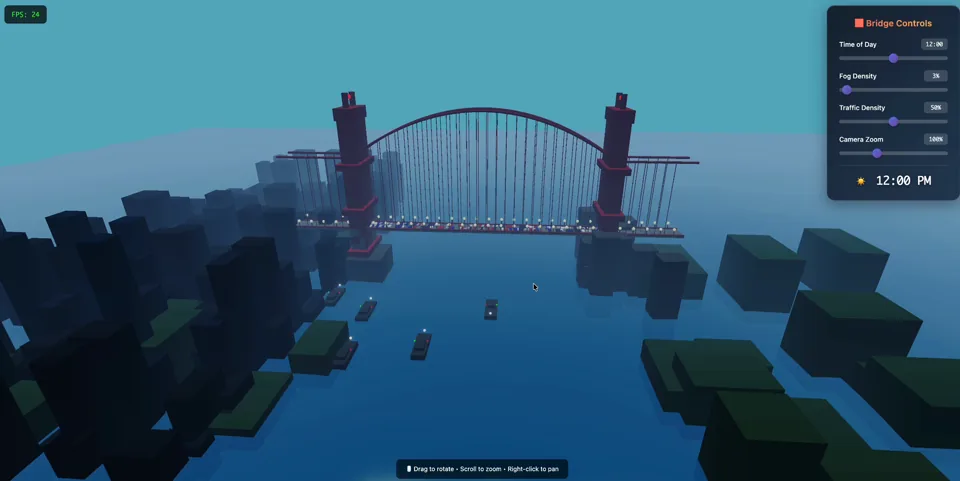
Not every useful browser-game reference needs enemies, scoring, and a win screen. Golden Gate Bridge — 3D Cinematic is an interactive Three.js scene built to demonstrate atmosphere, camera control, environmental systems, and browser-native presentation.
That distinction is important. The scene is not marketed as a complete progression game. It is a production reference for one of the hardest early questions in 3D work: can the player immediately understand the space and feel that it is alive?
Establish the landmark before adding controls
The bridge provides a strong visual anchor. Towers, cables, roadway, water, shoreline, traffic, ships, birds, fog, and light all reinforce the same location. The scene can therefore add movement without losing its identity.
This is a useful constraint for an AI game builder workflow. Start with one readable subject and let secondary systems support it. A scene with ten unrelated effects can feel less complete than a scene where every system explains the same place.
Let the camera teach scale
The player can drag to rotate, scroll to zoom, and right-click to pan. These controls are not a separate game mechanic; they are a way to inspect the landmark.
Rotation reveals how the towers, deck, cables, shoreline, and water relate. Zoom changes whether the player reads the bridge as an icon or a constructed space. Panning makes the environment feel larger than one fixed composition.
Camera interaction is especially valuable for a 3D browser scene because it converts visual fidelity into understanding. The user does not only watch the scene; they test its depth and continuity.
Make atmosphere adjustable
The control panel exposes time, fog, traffic, and camera changes. Each setting affects a different layer of the experience:
- Time changes light direction, contrast, color, and the prominence of silhouettes.
- Fog changes depth separation and how quickly distant geometry disappears.
- Traffic changes the visible rhythm across the bridge deck.
- Camera controls change whether the scene reads as a postcard, an environment, or a system.
Adjustable atmosphere makes the scene more useful than a prerecorded flythrough. The same geometry can be examined under different conditions without rebuilding the page.
Use motion at multiple scales
Traffic, ships, birds, water, fog, and camera movement operate at different visual scales. Small road motion makes the deck feel active. Ships connect the bridge to the bay. Birds add near-field movement. Water provides continuous surface motion, while fog changes the larger depth field.
Because these motions serve different layers, they can coexist without every element competing for attention. The bridge remains the subject.
Design for smooth browser presentation
The scene is designed around a smooth approximately 60 FPS target rather than an unlimited asset budget. Browser-native 3D needs a clear priority order: preserve camera response and the landmark silhouette first, then spend remaining budget on water, traffic, atmosphere, and ambient life.
That priority also improves perceived quality. A responsive camera with coherent lighting often feels more polished than a heavier scene that stalls during interaction.
Know what the reference proves
Golden Gate Bridge proves that a web page can deliver a cinematic 3D environment with direct camera control and several coordinated systems. It does not prove that the same scene contains a complete game loop.
That honesty makes the reference more useful. A full game built from a similar foundation would still need a player goal, meaningful actions, feedback, failure, restart, and progression. The scene supplies atmosphere and spatial proof; game design must supply the rest.
Explore the scene, then define an original world
Open the Golden Gate Bridge demo and test the camera, time, fog, traffic, water, ships, and birds directly. Then compare it with LOADPATH ZERO, where a 3D environment supports first-person decisions, failure, scoring, and retry.
If you want to build a different browser world, use OpenGame Studio to define an original landmark, camera, atmosphere, interaction, goal, and performance budget. Treat the finished bridge as evidence that coordinated 3D systems can run in a browser, not as a scene to copy.