
Game guides
Bodycam Stuck Registering With EAC: v0.9.1 Checks
Bodycam v0.9.1 fixes a known EAC registration hang. Check your version, separate joining failures from launch errors, and prepare a useful support report.
If Bodycam is stuck registering with EAC, check for v0.9.1 before changing your PC. The November 16 patch explicitly fixes a case where players became stuck during Easy Anti-Cheat registration when joining a session. It also removes an additional joining delay of roughly 25 seconds per extra simultaneous connection. That is a specific fixed bug, not proof that every EAC error is resolved.
Applies to: Steam PC v0.9/v0.9.1. Checked: November 18, 2026, against the official patch. EAC was introduced with v0.9 on November 13. We have not reproduced the hang or tested a repair on a Windows client.
Step 1: establish the installed version
Close Bodycam, let Steam finish pending updates, and reopen the main game. Ask the host to update too. Record the displayed version and, if available, build information. The separate November playtest is not evidence that your main installation is current.
If you were on v0.9 when the hang occurred, update before retrying. If it happens again on v0.9.1, retain the new error and the exact stage. Do not assume that an old screenshot and a new failure necessarily share one cause.
Step 2: identify where the failure happens
- Game launches, but joining stays at EAC registration: this matches the stage addressed by v0.9.1. Confirm both players updated, then try one fresh session.
- Game will not launch and gives a numbered EAC error: consult the matching official EAC article. “EAC is not installed”, unknown-file-version errors and error 30005 have different diagnostic paths.
- Game launches but the group cannot queue: first check the Custom versus Quick Play rules. A missing party system is not an anti-cheat installation failure.
- You enter a session and later disconnect: capture the exact disconnect message and elapsed time. The registration-fix note alone cannot identify its cause.
This classification prevents changing anti-cheat files to solve a matchmaking restriction. It also separates a visible error from a general description such as “stuck joining server”.
Step 3: verify files when the installation may be incomplete
Use Steam's documented route: Library → Bodycam → Properties → Installed Files → Verify integrity of game files. Allow verification and any repairs to finish, then relaunch once. Steam advises against running verification for several games at once or alongside intensive disk tasks.
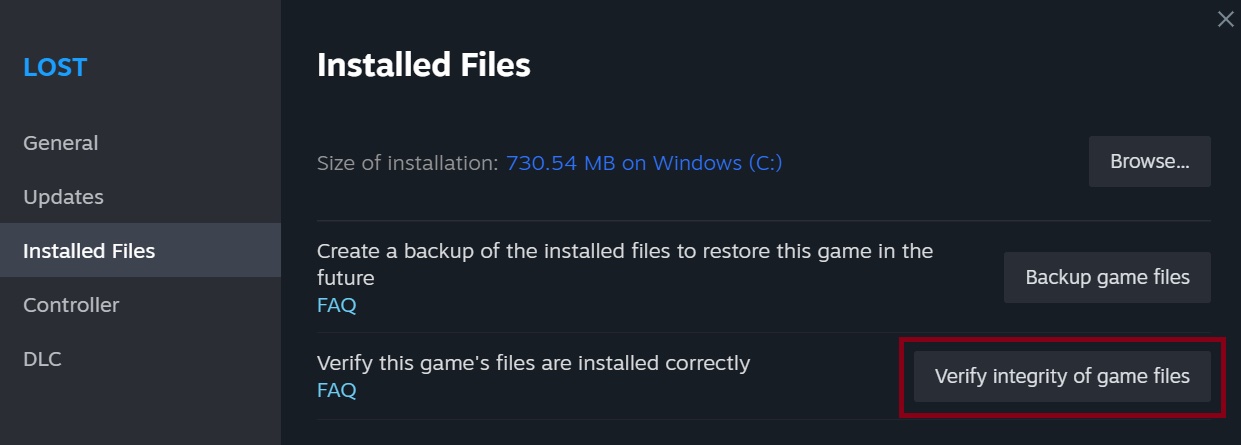
Verification checks installation files; it is not a promise to fix a server-side incident or every registration timeout. Record whether Steam repaired anything and whether the symptom changed. Keep your observation separate from somebody else's report that verification helped them.
Step 4: make one useful comparison
After updating and checking files, try one fresh session with the same mode. If practical, compare joining another host with creating your own Custom or Zombies session. This is a diagnostic comparison, not a guaranteed workaround. Note whether only one PC fails, only one host fails, or every attempted session fails.
Stop repeating the same attempt if the result is unchanged. Reinstalling the whole game repeatedly gives less useful evidence than one clear version-and-error report. Do not use bypass launch flags, random replacement DLLs or disable anti-cheat as a route into protected matches. This guide does not prescribe deleting saved configuration or turning off Windows security.
What remains unresolved?
Confirmed fixed: the particular session-join registration hang and accumulating join delay described in v0.9.1. Not established: whether your current timeout has the same cause, whether a launch error is local, or whether all regions and hosts behave identically. The official patch is not a comprehensive list of every remaining EAC issue.
EAC's support catalog still describes distinct launch/service/file errors. Their existence does not establish that Bodycam v0.9.1 currently suffers from each one. Treat a new post-patch report as a report until its version, reproduction and remedy are confirmed.
Send a report that can be investigated
Include the date and timezone, game version/build, exact message or error code, Windows version, selected mode and map, host or joining role, and the step where it stops. State whether another host works and what changed after updating or file verification. Add a cropped screenshot of the error with personal account details hidden. Use the developer's support route linked from the official Steam page or the relevant EAC support article.
Once joining works, the Zombies guide covers the first-run preparation separately.
A reproducible test and a support-report template
Change one thing at a time. Record the original failure, update, try once, then verify files if the symptom remains. If you change the host, mode and installation simultaneously, a successful attempt will not tell you which change mattered. ‘Still broken’ is less actionable than ‘v0.9.1; joining a friend's Custom; registration stops; own hosted session loads’. This is an example report format, not a reproduced result.
Copy and fill in these fields before reporting:
- Date, time and timezone:
- Bodycam version/build and Windows version:
- Mode/map; hosting or joining:
- Exact on-screen message/code:
- Last successful step; first failed step:
- Did another host work?
- Result after updating and after file verification:
- Screenshot with account details hidden:
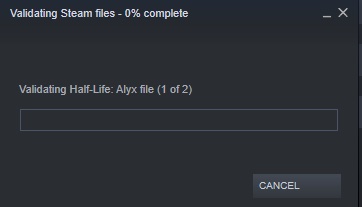
What does the verification window prove? The Steam image below shows a generic verification in progress, not a repaired installation. Wait for Steam to finish, then record its result and retry. A local configuration file that fails verification can be normal according to Steam; the message alone does not establish a broken Bodycam executable. If you still cannot join, preserve the new symptom rather than claiming verification fixed it.
Does an EAC error mean a ban? An error code alone does not establish a ban; read the exact message and use the relevant support route. Will waiting exactly 25 seconds fix joining? No: the patch describes a removed cumulative delay, not a waiting-time remedy. Should I use a forum DLL or bypass EAC? No such workaround is part of this guide; use the official version and error-specific support.
Source note and verification limits
Primary evidence: v0.9.1, v0.9, Steam file-verification instructions and EAC support, checked November 18. The Steam illustration is an official generic operation screenshot, not a Bodycam repair performed here. No v0.9.1 error screen was reproduced; a successful fix or its success rate is not claimed.