
Game guides
Bodycam: How to Play With Friends in v0.9.1 on PC
Play Bodycam with friends using Custom or a Zombies session. Understand solo-only Quick Play, party-system limits and what to check before joining.
Bodycam multiplayer with friends currently works through Custom games or a directly created Zombies session. Quick Play and the Server Browser remain solo-queue routes. Gathering in a lobby does not unlock a shared matchmaking queue.
Applies to: Steam PC, v0.9 with the v0.9.1 patch. Checked: November 18, 2026. The developer documents these routes in the v0.9 announcement; v0.9.1 fixes joining issues but does not announce a party-system release. This is a source-checked guide, not a hands-on multiplayer test.
Choose the route before inviting everyone
- Custom: create a match with the players already in your lobby. The developer says solo players can fill empty slots, so Custom should not automatically be read as a private, friends-only match.
- Quick Play / Server Browser: solo queue. Starting searches simultaneously does not reserve spaces or guarantee the same team.
- Zombies: create a Zombies game directly for a group of up to four, including the host. This is the documented cooperative route.
Custom: get the group into a hosted match
- Have everyone finish updating the main Bodycam game and reopen it. Do not mix the separate November playtest with the retail game.
- Choose one host and invite friends into that player's lobby. Check the lobby roster before creating the match. The official announcement assumes this lobby step; it does not document the exact current invite-button sequence. Steam overlay invitations are a commonly reported approach, but their v0.9.1 labels and delivery have not been verified here.
- Open Custom and create your own game with the lobby's players. Select the settings your current build actually offers; this guide does not promise an unverified password or privacy switch.
- Confirm that everyone has loaded into the intended session. Sharing a match is not the same as the forthcoming party system's promise to keep a squad on one team. Check team assignment before starting your planned activity.
- If somebody cannot enter, record the displayed message and whether the failure happened while entering the lobby or loading the match. Use the EAC joining checklist for registration failures.
A useful first attempt is a two-person Custom session. Once both players can enter, bring in the rest of the group within the capacity shown by the selected mode. This is an editorial troubleshooting order, not a tested minimum-player rule.
Zombies: use the cooperative session path
Create a Zombies game directly and keep the group at four players or fewer. Choose the same map and wait until everybody is in before treating the run as ready. For a concrete objective, Zombie Trenches asks the group to survive ten minutes; Village and Asylum use wave-based encounters. See the Zombies first-run guide for the differences.
Do not confuse the November 11–12 playtest's invitation allowance with permanent free access for friends. Those invitations concerned a time-limited, separate Steam playtest.
Party system: what is still missing?
The developer describes the intended system as forming a squad, queuing together, staying on the same team and following a leader between lobby and matches. It is absent from v0.9. The stated problem was match-slot reservation: several groups could target the same remaining spaces and become split. The team is rebuilding the solution with EOS and custom technology, without a committed release date.
A successful Steam invitation therefore proves only that the invitation worked. It does not establish group matchmaking, team preservation, dedicated servers or a future release date. The v0.9.1 EAC fix does not change this distinction.
If the group cannot start
A party-size or queue restriction: first check whether you chose Quick Play or Server Browser; switch to the documented Custom or Zombies route. A missing friend in the lobby: resolve the invitation and version mismatch before creating another match. A registration hang: check v0.9.1 and the exact error, rather than repeatedly splitting and rebuilding the group.
Before the next session, agree on one host, one mode and one map. Keep this page alongside the two linked guides so that joining problems and in-match survival do not become the same troubleshooting task.
Two practical group setups
Two friends want PvP. First decide whether your goal is sharing one match or guaranteeing one team. Custom is the documented route to create a match together; do not promise team preservation. The host waits for the second player to appear in the lobby, creates Custom, and both check the loaded session. If the second player is absent before creation, troubleshoot the invitation. If present before creation but missing afterward, record a match-entry failure. This distinction gives your next attempt a specific purpose.
Four friends want co-op. Count the host as one of the four places, agree on the same Zombies map and create that mode directly. A fifth person means the proposed group exceeds the documented co-op limit; repeating invitations will not change it. Confirm the roster before beginning a survival attempt. This is a planning example based on the published capacity, not a recorded four-PC test.
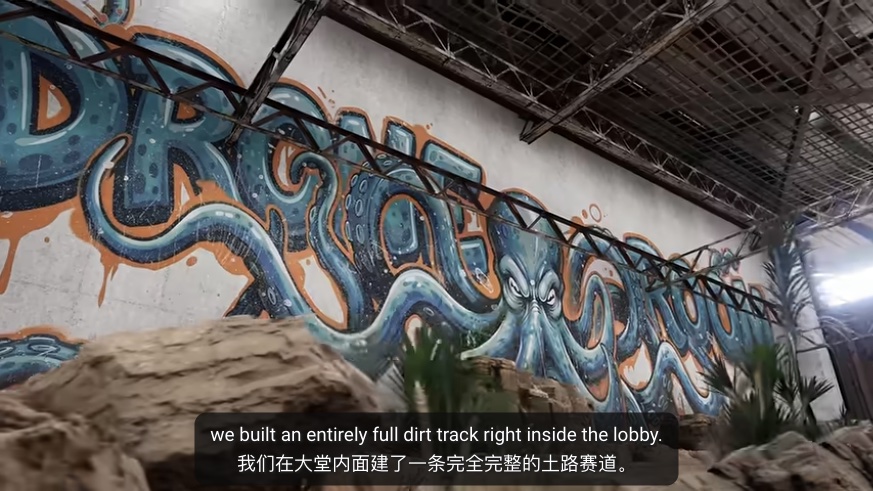
Still in a shared lobby? A lobby can contain activities such as the new drone/RC room shown below. Seeing friends there confirms that you share that space, not that a matchmaking squad exists. Do not use a working lobby minigame as proof that Quick Play will carry the group into a match.
Can a random player join Custom? The developer says solo players can fill remaining slots. Can I queue with friends anyway? Simultaneous solo searches offer no reservation guarantee. When will Party System arrive? No committed date was published in the announcements checked here.
Source note and verification limits
Primary sources: v0.9, November 13, especially “About the party system”, and v0.9.1, November 16. Both were checked on November 18. No Windows client, two-PC invitation, team assignment, privacy setting or match completion was tested. The current invitation controls and privacy settings have not been verified hands-on.