
3D arena combat
Control Resonant
Three weapon forms, a Resonance meter, and a three-phase Warden.
What is Control Resonant?
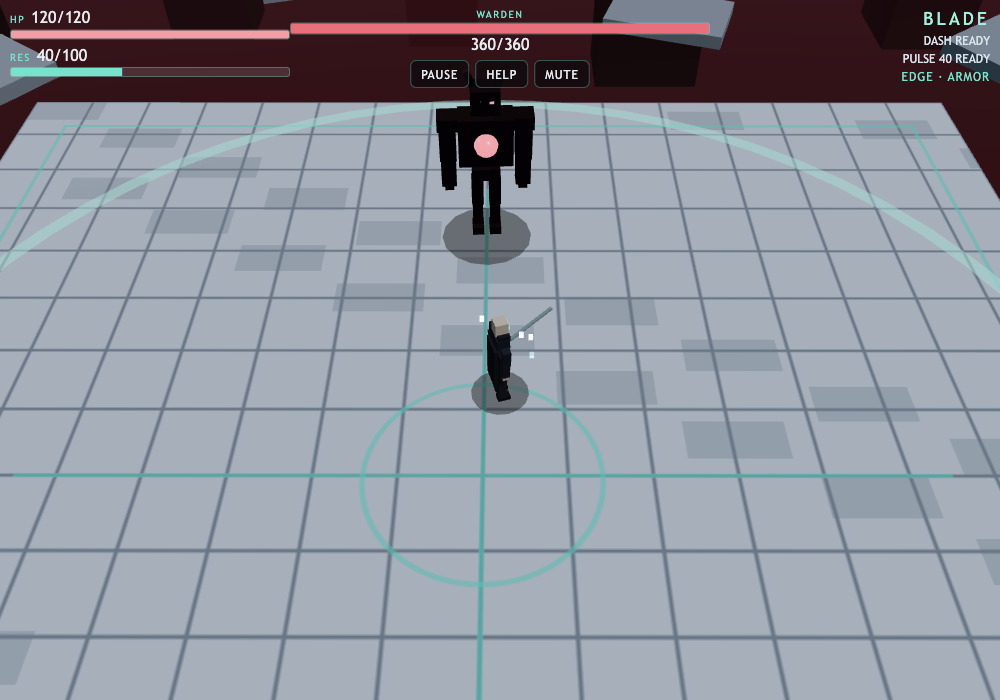
Control Resonant is a short 3D combat game built around changing weapons during a fight. Clear two arena stages, choose an upgrade after each, then face the Warden in the third stage. Blade supplies a quick three-hit combo, Hammer trades speed for a harder hit and stronger knockback, and Scythe reaches farther. Gravity-fold transitions change the arena presentation between stages; movement and combat stay on a flat arena floor.
Play Control Resonant
Open full page (opens in a new tab)Click or tap inside the game to begin using its controls.
Published
Play Control Resonant with a desktop keyboard or the on-screen touch stick and action buttons. A WebGL-capable browser is needed for the 3D scene. Low quality and Reduced motion options are available in the menus. Portrait and landscape touch layouts are supported.
01Learn the controls
Controls for Control Resonant
| Action | What to use |
|---|---|
| Move | WASD or arrow keys; left touch stick |
| Attack | Space, J, click the playfield, or Attack; hold Space/J or Attack for repeated attacks |
| Dash | Shift or K; Dash button |
| Cycle weapon | Q or Morph: Blade → Hammer → Scythe → Blade |
| Resonance Pulse | E or L; Pulse button; requires 40 Resonance |
| Pause | P, Escape, or Pause button |
02Your first run
How do you play Control Resonant?
Learn Blade before morphing
Start Control Resonant and move into melee range. Hold Attack to see Blade’s combo, then step away from enemy attack warnings. Damage dealt fills the Resonance meter.
Change the reach and pace
In Control Resonant, press Morph to cycle through Hammer and Scythe. A morph requested during a swing is queued until recovery, so allow the current attack to finish before expecting the new weapon.
Choose two different upgrades
After each of the first two stage clears, select Resonant Edge for +20% damage, Seam Armor for +20 maximum HP and a full heal, or Fracture Step for a faster dash. Each upgrade can be taken only once.
Finish the Warden fight
In Control Resonant’s third stage, watch the boss’s attack warnings and use Dash to evade. Build at least 40 Resonance through hits, then use Pulse near the boss to deal damage and stagger it. Defeat the Warden to reach the victory results.
03Make the next run count
How can you improve at Control Resonant?
Match the weapon to your opening
Control Resonant’s Blade has a short recovery that supports repeated attacks. Hammer has a longer windup and recovery, so use a clear opening. Scythe has the longest reach, letting you strike from farther away.
Spend Pulse where it can connect
Pulse hits nearby enemies and staggers survivors; it also removes nearby projectiles. Close the distance before spending the meter instead of firing it across the arena.
Use the health upgrade deliberately
Stage clears restore up to 25 HP. Seam Armor gives a full heal as well as a larger health pool, so it is especially useful when a stage ends with low health.
04Before you play again
Questions about Control Resonant
Why does Morph wait in Control Resonant?
In Control Resonant, a morph made while an attack is active waits for recovery. It changes to the next weapon after that swing rather than interrupting it.
Why will Resonance Pulse not activate?
Control Resonant’s Pulse needs at least 40 Resonance and must be used during combat. It also has a short cooldown. Land melee hits to replenish the meter.
Can I choose the same upgrade twice?
No. Control Resonant disables taken upgrades on later upgrade screens. You choose one after each of the first two stages.
Is this an open-world exploration game?
Control Resonant is a three-stage arena prototype. Gravity folds are visual transitions around a flat combat space, with the Warden as the final encounter.
About this Control Resonant guide
Guide by OpenGame. Content reviewed .
The controls and rules describe the published game on this page. Screenshots show the game at the stage noted in each caption. Later game revisions may change its behavior.
Learn how OpenGame works, or contact support to report a guide correction.