
Game guides
GTA 6 PC Release Date: Is GTA 6 Coming to Steam?
The GTA 6 PC release date, Steam plans and system requirements are still unannounced. Check the official launch platforms and where to look for updates.
As of November 19, 2026, Rockstar has yet to announce a GTA 6 PC release date, a Steam release or PC system requirements. Rockstar’s product page and Take-Two’s November 9 release schedule list PlayStation 5 and Xbox Series X|S for the November 19 console launch. Rockstar’s GTA VI page · Take-Two’s release schedule
Choose a route for the hardware you own
| What you have | What to do |
|---|---|
| Windows PC only | Wait for a Rockstar announcement for PC. Check the service’s game listing separately if you want to stream from the cloud. |
| PS5 with GTA VI installed | Play on your PS5 or connect to it using the PS Remote Play app for Windows or Mac. |
| Xbox Series X|S with GTA VI installed | Play on your Xbox or connect to it from a supported computer browser through Xbox Remote Play. |
| Buying through Steam | Look for the full title and publisher on the Steam product page. GTA V Enhanced belongs to the previous game. |
GTA 6 on Steam
We found no official Steam product page for Grand Theft Auto VI in our November 19 check. If you see a listing while searching, check the full title. Grand Theft Auto V Enhanced is Rockstar’s earlier game, and the system requirements on its Steam page apply to that game. Use a publisher announcement naming GTA VI and Steam, or a Rockstar-published Steam product page for GTA VI, to confirm the storefront. A store page without a date would still leave the release date open. Steam’s GTA V Enhanced listing
Can you play GTA 6 on a PC through streaming?
A native PC release would install and run on your computer. Remote Play streams a copy running on your own supported console to another device. Rockstar confirms Remote Play support on PlayStation and Xbox consoles. Its Xbox Cloud Gaming update names Xbox One and Xbox Series X|S consoles. For GTA VI cloud access on a PC, check for a GTA VI listing that explicitly offers cloud play on your device and in your region. Rockstar’s platforms and editions FAQ
PS5 to Windows or Mac
- On the PS5, find Settings → System → Remote Play and switch the feature on for your user.
- Install PS Remote Play on your computer. Connect a supported controller and sign in with the PlayStation account you use on the console.
- Select your PS5 in the app. Once the console screen appears on your computer, open GTA VI from its library.
For the first connection, keep your PS5 on and try it from home. If you plan to connect while the console rests, enable its internet and network wake options for rest mode. Sony recommends at least 5 Mbps in both directions and 15 Mbps for best performance. Those speeds refer to the PlayStation streaming feature. PlayStation Remote Play setup
Where does the game run?
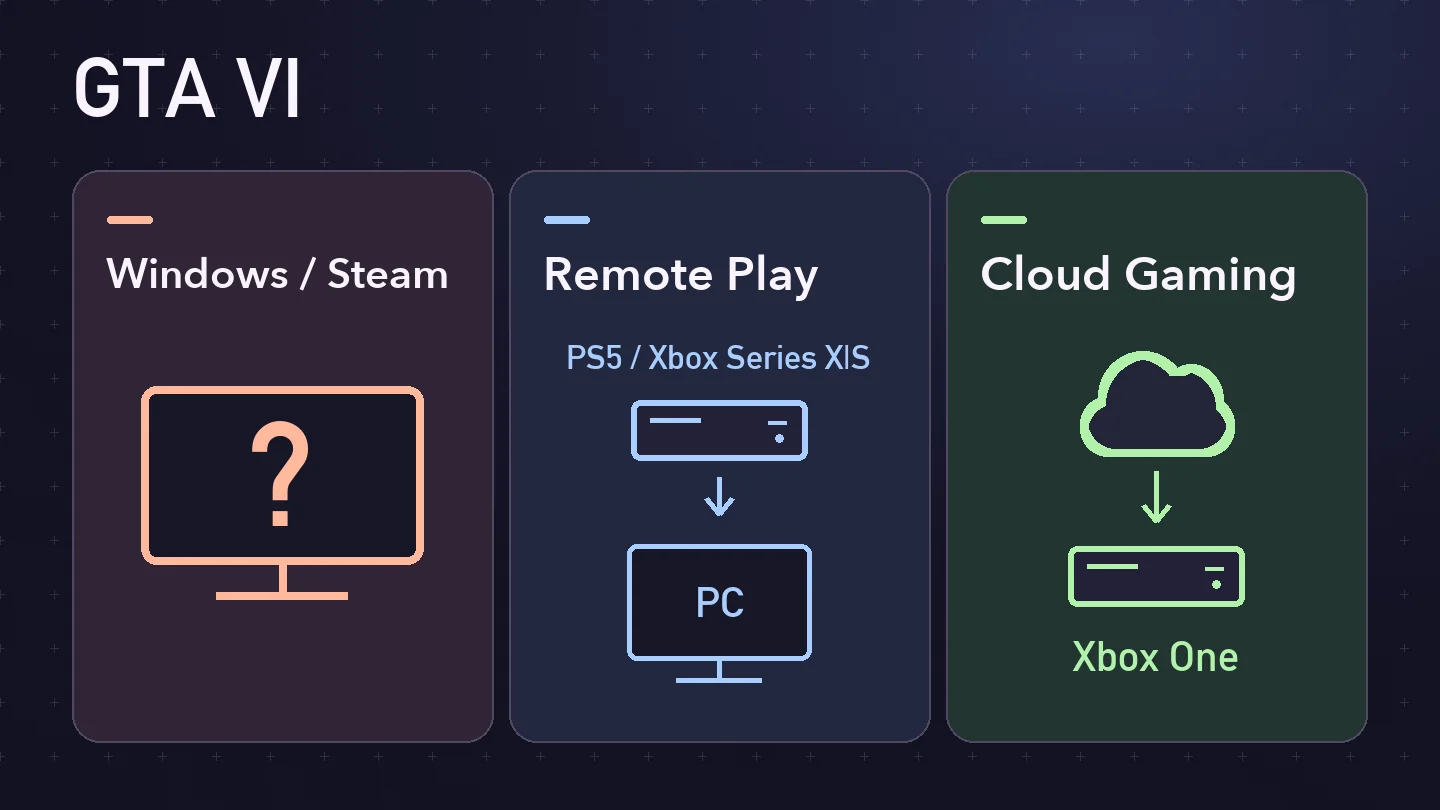
OpenGame’s original silent animation shows Remote Play from your own console to a PC, and cloud streaming to an Xbox One. Rockstar has yet to announce a native Windows version.
PS Remote Play | PS5
PlayStation’s video shows how Remote Play streams a PS5 game to another screen. The written steps above cover setup on a Windows PC or Mac.
Watch on YouTubeXbox Series X|S to a computer browser
- On the console where GTA VI is installed, enable remote features and leave the console available for a connection.
- Open Xbox Remote Play in a supported browser and sign in with the Microsoft account you use on the console.
- Select your console. When its home screen appears, open GTA VI from the console library.
If your console is missing, check its remote settings and sign-in first. If the feed appears but the game stays locked, try starting GTA VI directly on the console and check the game installation and license there. Xbox device and network requirements
See the Xbox One cloud gaming guide for the supported console route and the GTA 6 release date and regional unlock table for the console rollout.
What to check before buying or upgrading for PC
- Look for Grand Theft Auto VI listed for Windows PC on the game page or in a dated Rockstar announcement. Use a date only when the publisher or its storefront gives one for PC.
- Check the storefront named in the announcement. A Windows PC announcement may leave Steam and other stores unspecified.
- Wait for the published minimum and recommended PC specs before choosing hardware for this game. Check the listed operating system, processor, graphics card, memory and storage together.
Source note
OpenGame checked the official launch platforms and storefront information on November 19, 2026. The original launch announcement covers the console editions. For new platform announcements, start with Rockstar’s Newswire. Take-Two’s launch announcement · Rockstar Newswire
The setup steps follow PlayStation and Xbox documentation. OpenGame has yet to test a GTA VI streaming session.