
Management
Lumber Tycoon
Carry your first log, then build a working timber business.
What is Lumber Tycoon?
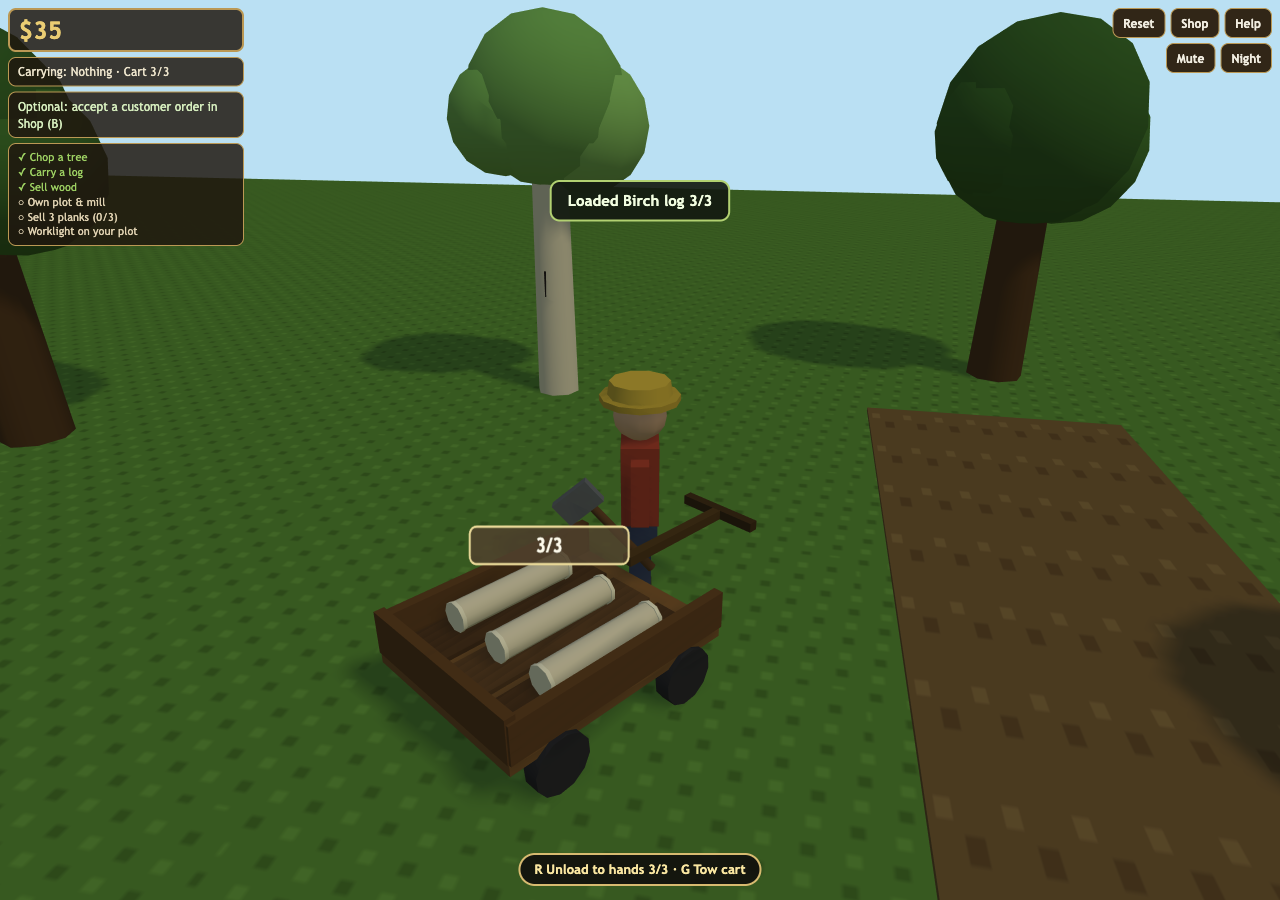
Lumber Tycoon is a small 3D yard simulation built around physical work: chop a nearby tree, carry individual logs, sell them or feed a sawmill, then reinvest the cash. A handcart moves three pieces at once. Optional customer orders reward matching deliveries, while a worklight and owned plot complete the main business milestone. The generated title screen currently calls the game Timber Yard Tycoon.
Play Lumber Tycoon
Open full page (opens in a new tab)Click or tap inside the game to begin using its controls.
Published
Lumber Tycoon is easiest to inspect and control with a desktop keyboard and mouse. Touch devices have a joystick and action buttons; phone Shop and Orders panels need scrolling. This is a single-player yard prototype with no persistent save.
01Learn the controls
Controls for Lumber Tycoon
| Action | What to use |
|---|---|
| Move and inspect the yard | WASD or arrow keys; mouse drag to orbit, wheel to zoom. Touch uses the joystick. |
| Chop a nearby tree | Space, click the highlighted tree, or tap Chop. |
| Handle wood and the worklight | E picks the ringed piece or drops at the preview; Q rotates carried items; F unboxes or toggles the light. |
| Use the handcart | R loads or unloads a nearby detached cart; G tows or detaches with empty hands. Touch has cart buttons. |
| Open shop, orders and help | B for Shop / Orders; H for Help, or the on-screen buttons. |
02Your first run
How do you play Lumber Tycoon?
Earn cash from raw wood
Start Lumber Tycoon by approaching a tree and chopping until it drops logs. Pick up the ringed log and drop it at the SELL BAY. The valid drop preview helps distinguish selling from leaving wood on the ground.
Build a processing yard
Buy the plot before the sawmill. Carry raw logs to INTAKE, wait for processing, then pick up planks at OUTPUT and sell them. A busy mill does not process a second log immediately.
Combine orders and equipment
Accept one optional order in Shop before selling its requested wood. Use the three-piece cart for batches; detach it to chop or load. Reinvest in the axe, mill upgrade or worklight.
Complete the business milestone
Own the plot and sawmill, sell at least three planks, and place an illuminated worklight on your plot. Continue Playing keeps the yard open after the milestone.
03Make the next run count
How can you improve at Lumber Tycoon?
Accept an order before delivery
Lumber Tycoon counts only future matching SELL BAY drops toward an accepted order. Loading the cart or making earlier sales does not advance an order. Bonuses pay once; abandoning keeps sale cash but clears that order’s progress.
Check cart state before working
Lumber Tycoon’s cart holds three logs or planks. Detach before loading or unloading and empty your hands before towing. A fourth piece stays in your hands when the cart is full.
Upgrade for a specific benefit
The steel axe reduces chops, while the mill upgrade shortens processing and increases plank prices. The worklight must be unboxed, placed on your owned plot and switched on; buying its crate alone does not finish the milestone.
04Before you play again
Questions about Lumber Tycoon
Is this Lumber Tycoon the Roblox game?
This Lumber Tycoon is an original, single-player browser prototype with one small yard. It has its own chop, carry, process and sell loop and does not include a persistent world or multiplayer.
Why is my Lumber Tycoon customer order not progressing?
In Lumber Tycoon, accept the order first, then sell the matching species and raw-log or plank type at the SELL BAY. Only those future sales count; moving cargo or selling the wrong type does not.
How do I load and tow the cart in Lumber Tycoon?
Lumber Tycoon uses R to load or unload near a detached cart. Tow with G while your hands are empty. Capacity is three wood pieces, and the worklight cannot ride in it.
How do I finish Business Established in Lumber Tycoon?
Lumber Tycoon checks that you own the plot and sawmill, have sold at least three planks, and have the worklight switched on while placed on your owned plot. You can then continue playing and pursue the optional mastery checklist.
About this Lumber Tycoon guide
Guide by OpenGame. Content reviewed .
The controls and rules describe the published game on this page. Screenshots show the game at the stage noted in each caption. Later game revisions may change its behavior.
Learn how OpenGame works, or contact support to report a guide correction.