
Gymnastics · Physics · Timing
NoomiClone
One swing. One release. Another chance to catch.
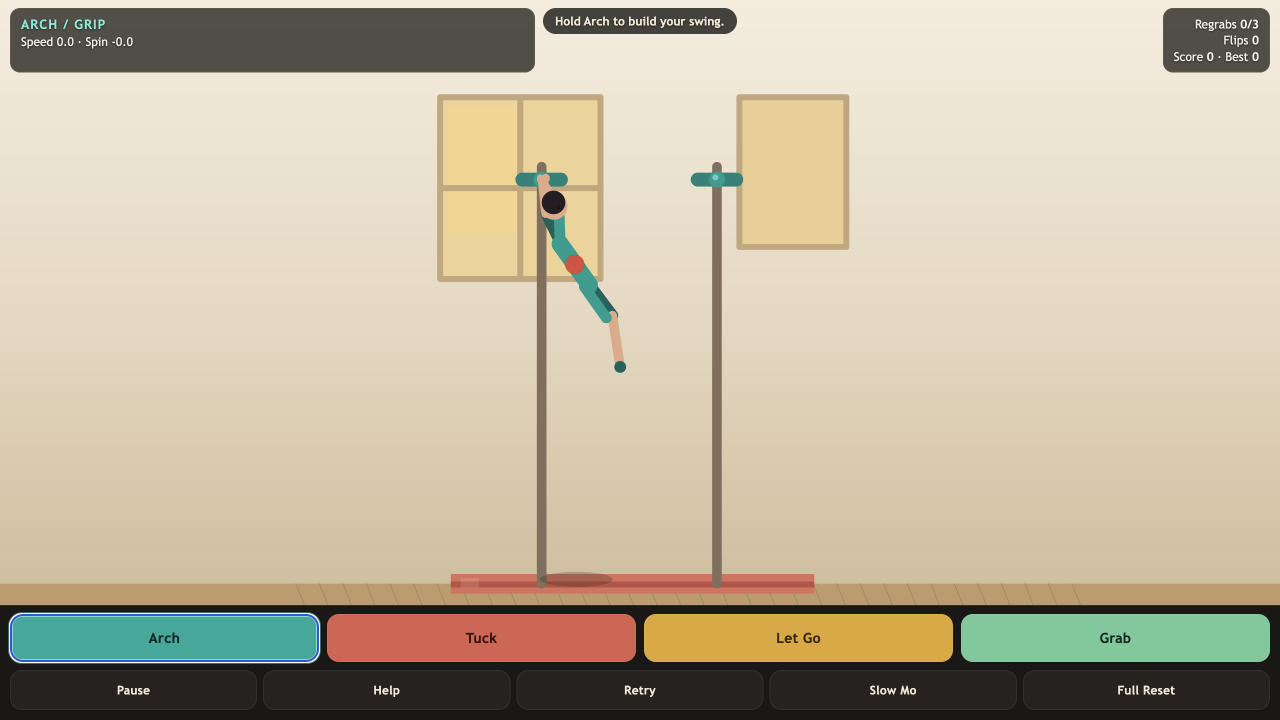
What is NoomiClone?
NoomiClone is a small gymnastics physics game built around the moment your hands leave the bar. Arch to build momentum, release into the air, then change your body shape to control rotation. The challenge is to chain three real regrabs in one run. Extra flips add score, but a controlled catch matters more than a spectacular fall.
Play NoomiClone
Open full page (opens in a new tab)Click or tap inside the game to begin using its controls.
Published
Play NoomiClone with a keyboard on desktop or the four on-screen action buttons on a touch device. Open the game on its own for more room. Click or tap inside the player before using keyboard controls.
01Learn the controls
Controls for NoomiClone
| Action | What to use |
|---|---|
| Arch and build momentum | Hold A or Left Arrow; on touch, hold Arch. |
| Tuck and rotate faster | Hold Space or Tuck. Release to extend and slow your rotation. |
| Release the bar | Press W, Up Arrow or Let Go while attached. |
| Catch a bar | Hold G or Grab as your hands approach a bar. |
| Start another attempt | Press R or choose Retry. |
| Study your timing | Slow Mo halves simulation speed. Pause and Help stop the action. |
02Your first run
How do you play NoomiClone?
Build a swing before leaving the bar
Start NoomiClone and hold Arch. Watch the gymnast travel through the bottom of the swing and rise again. Releasing from a weak swing gives you little time to line up the next catch.
Release on the way up
Use Let Go while rising. You are now in free flight: the bar no longer supports you, and the momentum of your swing determines the flight path.
Tuck briefly, then extend
Hold Tuck to rotate faster in the air. Let go of Tuck to lengthen the body and reduce the spin. NoomiClone counts a full airborne rotation as a flip; spinning while still attached does not.
Bring your hands back to a bar
Hold Grab near a bar and watch the hands, not just the body. NoomiClone increases the regrab counter after a catch following real detached flight. Repeat until it reaches three, then continue in Practice if you want to keep going.
03Make the next run count
How can you improve at NoomiClone?
Learn a reliable catch before chasing flips
Make a single release and regrab your first NoomiClone target. Change one thing on each retry, such as when you release or how long you tuck. Extra rotation is useful only if you can still bring your hands into reach.
Use Slow Mo to read the approach
NoomiClone’s Slow Mo gives you more time to see whether your hands will meet the bar. It does not create a catch from a distance. When the timing feels familiar, switch it off and try the same sequence at normal speed.
Prepare for the floor early
If a NoomiClone catch is out of reach, extend and aim for a slow, nearly upright, feet-first landing. Arriving head-first, hitting with your body or leaving the gym ends the attempt. A safe landing is a different result from completing three regrabs.
04Before you play again
Questions about NoomiClone
Why does Grab not count as a NoomiClone regrab?
A NoomiClone regrab needs a real release, some detached flight and a catch with the hands close enough to a bar. Staying attached or trying to catch immediately does not count as a new sequence.
How do I do a flip in NoomiClone?
Release with enough height and hold Tuck while airborne. The compact body rotates faster. Complete a full rotation to earn a flip, then extend in time to prepare for a catch or landing.
Can I play NoomiClone on a phone?
The game has Arch, Tuck, Let Go and Grab buttons for touch play. You may need to hold one action while using another. Opening the game on its own gives the controls more screen space.
Does landing finish the NoomiClone challenge?
In NoomiClone, a safe landing ends that attempt without a crash, but the main challenge is three regrabs in one run. After completing the regrab challenge, you can continue in Practice.
About this NoomiClone guide
Guide by OpenGame. Content reviewed .
The controls and rules describe the published game on this page. Screenshots show the game at the stage noted in each caption. Later game revisions may change its behavior.
Learn how OpenGame works, or contact support to report a guide correction.