
The player has to finish
AI companions are practice runners, not other people and not substitutes for you. Even if a companion reaches safety, your objective remains three completed human crossings.
Chase · 3D · Single player
Three crossings. Five companions. A chase that changes with every round.
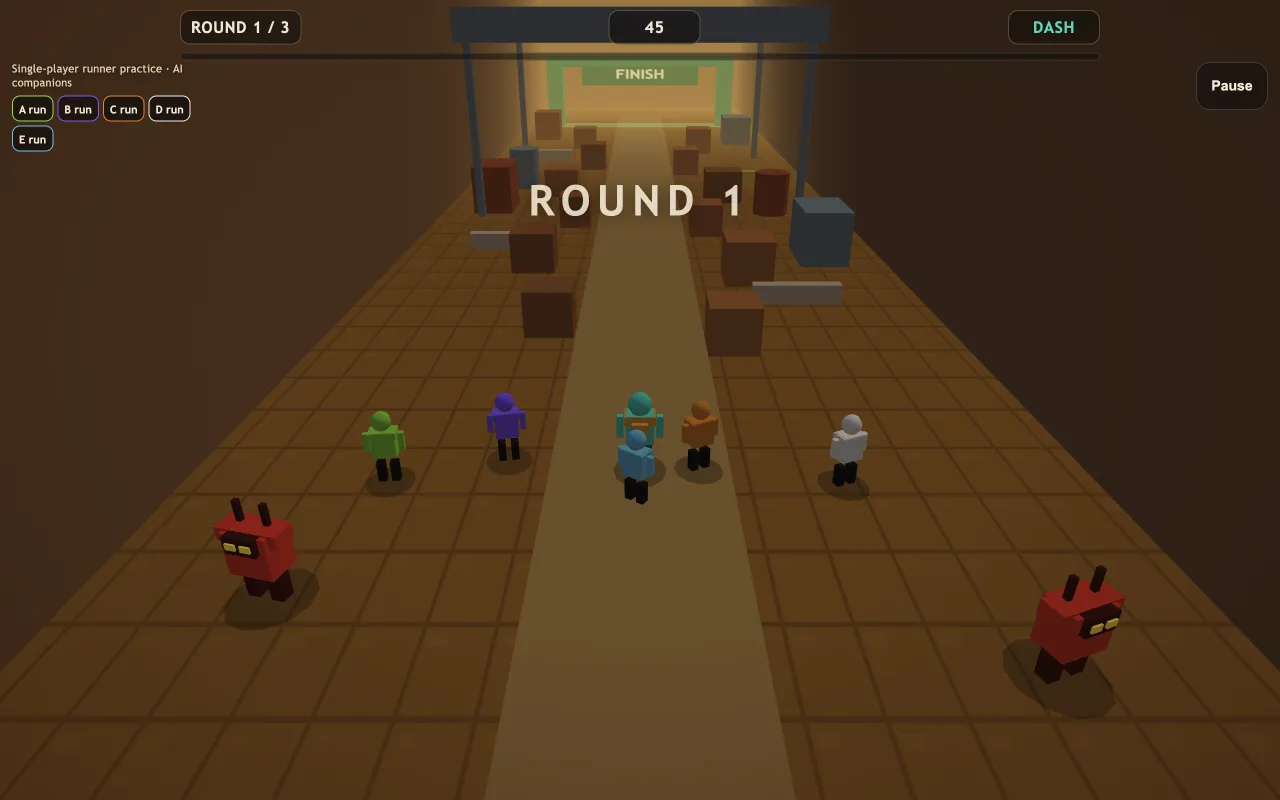
Huss Valley is a 3D runner-and-catcher game set in an industrial valley. Steer through crates and barrels toward the green finish gate while five AI companions run alongside you. Finish three crossings yourself to win. Between rounds, captured companions become catchers, making your next route harder to navigate.
Unofficial browser adaptation with an original course. The five companions are AI runners; this is a single-player game, not a Roblox server.
Click or tap inside the game to begin using its controls.
Published
Use a keyboard on desktop or the on-screen direction pad, Jump and Dash buttons on mobile. Open the full-page player for more room; landscape gives you a wider view of the course. Click or tap inside the game before using keyboard controls.
01Learn the controls
| Action | What to use |
|---|---|
| Move through the valley | WASD or arrow keys. A / Left moves screen-left; D / Right moves screen-right. On touch, use the four-direction pad. |
| Jump | Space or the on-screen Jump button. Leave room for your landing instead of jumping into more cover. |
| Dash | Shift, Q or Dash. Watch the visible cooldown before planning another burst. |
| Pause and resume | P, Escape or Pause. Choose Resume to continue the current crossing. |
| Retry the current crossing | Choose Retry after being caught or running out of time. Restart in the pause menu also retries the current crossing. |
| Begin with a fresh team | Choose New run when offered to reset the run and restore all five AI companions. |
02Your first run
Start the run and look down the course toward the finish gate. Check the round indicator, timer and dash meter. You control one runner; the five named companions move on their own. Their progress does not count as your crossing.
Advance through the industrial cover, steering around obstacles and leaving yourself an exit. Use jump and dash deliberately. A burst is most useful when you can see the space you will enter, rather than when you are already boxed in.
Once you finish, check which companions were captured. Those runners join the catchers on the next crossing. Do not assume the same route will work unchanged: look for a fresh opening and account for the additional pursuers.
Repeat until you have reached the green finish three times. If you are caught or the timer expires, retry that crossing. A retry gives you another attempt from the round checkpoint; you do not need to repeat earlier completed crossings.
Understand the game
The changing team is the central rule of Huss Valley. Read the cohort strip as a preview of the next round, not just decoration above the course.
AI companions are practice runners, not other people and not substitutes for you. Even if a companion reaches safety, your objective remains three completed human crossings.
A companion captured during a completed crossing becomes a pursuer in the following round. More captures mean more catchers to navigate around. The conversion changes the chase between rounds.
Retry keeps conversions from earlier completed crossings, but discards captures from the failed attempt. New run is the broader reset: it begins again with the original team of five companions.
03Make the next run count
Check the dash meter before committing to a narrow gap. Use the burst to reach open space, then steer toward your next exit while it recharges. Spending it against a crate leaves you with the same obstacle and one fewer escape option.
Crates and barrels make the course less predictable than a straight sprint. Plan a way around the next object before entering a gap. If a catcher closes in, change your route toward open ground rather than backing into a dead end.
Watch the companion statuses after a successful finish. A route that felt comfortable with fewer pursuers may need a different approach next round. Adjust your movement to the current chase instead of following an earlier path automatically.
Retry returns to the same round checkpoint, making it useful for learning. Try a different side of an obstacle or a later dash. Choose New run when you want to rebuild the team from the beginning instead of practicing the current crossing.
04Before you play again
No. This page contains an original, unofficial single-player browser adaptation of a runner-and-catcher loop. It has its own industrial course and five AI companions. It does not connect to Roblox servers or reproduce the full multiplayer experience.
Yes, the browser game includes a four-direction pad plus Jump, Dash and Pause controls. Open the full-page player for more space, and try landscape for a wider view. Desktop players can use WASD or arrow keys.
Complete three crossings by reaching the green finish yourself. Companions reaching the finish do not replace your objective. Avoid catchers and finish before the current round timer runs out.
Captured AI companions become catchers on the next crossing. Check the cohort strip between rounds to understand how the team has changed. This is part of the game’s progression, not new players joining a server.
Retry restores the current crossing checkpoint, preserving conversions from earlier completed rounds and discarding captures from the failed attempt. New run starts the whole run again with all five companions.
Click inside the player to give the game keyboard focus. If a pause or result menu is open, choose Resume or Retry first. You can also open the full-page player and use the same controls there.
Guide by OpenGame. Content reviewed .
The controls and rules describe the published game on this page. Screenshots show the game at the stage noted in each caption. Later game revisions may change its behavior.
Learn how OpenGame works, or contact support to report a guide correction.