
Courtyard · Ren
The central open area is your starting point. Ren provides the club note, giving you a reason to visit the pavilion. Talk to him before trying to complete Mika’s delivery.
School life · 3D · Adventure
A new campus. Four friendly faces. Three ways to make your first day.
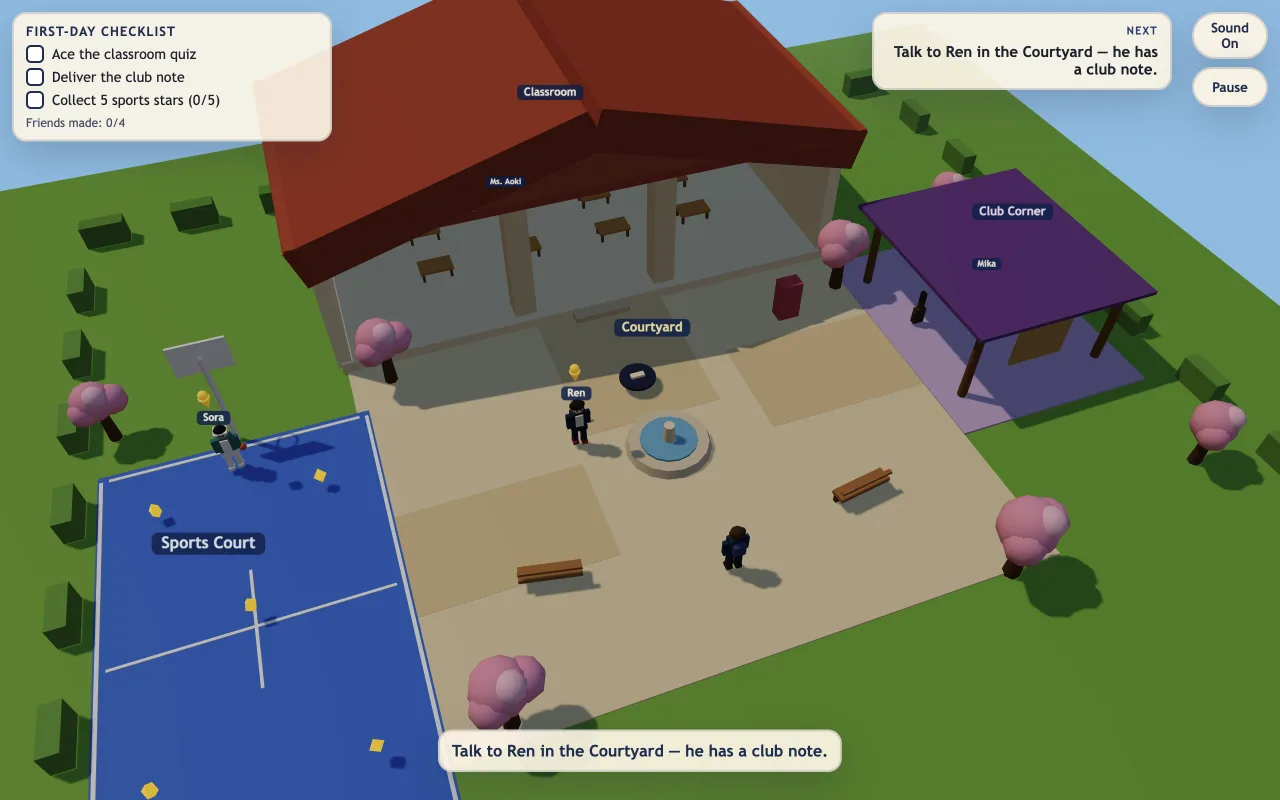
Morioh High is a relaxed 3D school-life adventure on a compact, Japanese-inspired campus. Meet four original characters, try a classroom quiz, deliver a club note and collect five gold stars. Complete all three activities to celebrate your first day. Explore the courtyard, classroom, lavender Club Corner and blue Sports Court at your own pace.
Unofficial school-life browser adventure with an original campus and characters. This page does not connect to the Roblox experience.
Click or tap inside the game to begin using its controls.
Published
Use WASD or arrow keys on desktop, or the on-screen movement and Interact controls on mobile. Click or tap dialogue options and quiz answers. The full-page player gives the campus and touch controls more room. The day pauses during menus, conversations and the quiz.
01Learn the controls
| Action | What to use |
|---|---|
| Explore the campus | WASD or arrow keys. A / Left moves screen-left; D / Right moves screen-right. Use the on-screen movement control on touch. |
| Talk or begin an activity | E, Enter or the touch Interact button when a nearby character or activity is highlighted. |
| Choose a response | Click or tap dialogue choices and quiz answers. Movement is locked while these panels are open. |
| Check your next activity | Read the First-Day Checklist and NEXT hint. Gold pins mark unfinished tasks around the campus. |
| Pause and resume | P, Escape or Pause. Choose Resume to return to your current day. |
| Start a fresh school day | Choose Restart day from pause, or Play again after completing all three activities. Both reset the day’s tasks and pickups. |
02Your first run
Choose Start school day, then walk toward Ren in the courtyard. When he is highlighted, press Interact to talk. Accept his club note and follow the next hint toward Mika. Get close enough for the interaction prompt rather than trying to click a tiny character from far away.
Head to the lavender Club Corner on the right side of the campus. Talk to Mika after collecting the note from Ren. Delivering it completes the club activity; walking to the pavilion without the note does not finish the task.
Visit the classroom and interact with Ms. Aoki to begin an untimed three-question quiz. Click or tap your answers. If an answer is wrong, read the feedback and try again. Quiz retries do not erase your other completed activities.
Find Sora at the blue Sports Court and collect the five visible gold stars around the court. Watch the checklist count rise to 5/5. When the quiz, club delivery and sports activity are all checked off, the first-day victory screen appears.
Understand the game
The whole adventure fits into four readable places. Use the labels, gold task pins and NEXT hint to orient yourself instead of searching for hidden menus.
The central open area is your starting point. Ren provides the club note, giving you a reason to visit the pavilion. Talk to him before trying to complete Mika’s delivery.
The red-roofed classroom holds the quiz activity. There are three questions, no answer timer and a retry after mistakes. Completed progress elsewhere on campus stays intact.
The lavender pavilion is the destination for Ren’s note. Approach Mika until she is highlighted, then interact. This is a delivery task; you do not need to collect a second note after completing it.
The blue court contains five gold star pickups. Walk over each star and check the on-screen counter. They belong to this first-day activity, rather than a currency shop or a repeatable online grind.
03Make the next run count
The NEXT hint tells you which character or activity to approach. The highlight tells you when you are close enough to interact. If the prompt asks you to step closer, move in a little more and press E or Enter again.
Ren gives you the note; Mika receives it. Visiting the Club Corner first is useful for learning the map, but the delivery needs the note in hand. Completing that small sequence makes the remaining checklist easier to read.
The quiz is untimed and retries are part of the learning loop. Read the answer feedback before selecting again. A wrong answer is not a failed school day, and you do not have to redo the note delivery or sports stars.
After an interaction or pickup, check the matching activity. If the sports counter is below 5/5, look for a remaining visible star on the court. Finish the three tasks before selecting Restart day, which intentionally clears the current day.
04Before you play again
No. This page hosts an original, unofficial school-life browser adventure with its own small campus and four original characters. It is separate from the Roblox experience and does not connect to Roblox servers.
Complete Ms. Aoki’s three-question classroom quiz, take Ren’s club note to Mika at the Club Corner, and collect five gold stars on Sora’s Sports Court. Completing all three brings up the first-day victory screen.
Mika at the lavender Club Corner receives the note. First talk to Ren in the courtyard to collect it, then approach Mika and interact. The note delivery only needs to be completed once per school day.
No. The quiz can be retried without erasing the club delivery or sports activity. Read the feedback and try again. Restart day is a separate action that resets the whole school day.
Yes. Use the on-screen movement control and Interact button, then tap dialogue options or quiz answers. You can open the full-page player for more space. Desktop players can use WASD or arrows plus E or Enter.
There is no fail state or countdown for the school day, and the classroom quiz is untimed. Menus, conversations, the quiz and pause stop movement. Explore at your own pace and use the checklist to find what remains.
Movement is deliberately locked while a menu, dialogue, quiz, pause or victory panel is open. Close or finish that panel first. To talk, get close enough for the character highlight, then press E, Enter or Interact. Click inside the game if keyboard input has lost focus.
Guide by OpenGame. Content reviewed .
The controls and rules describe the published game on this page. Screenshots show the game at the stage noted in each caption. Later game revisions may change its behavior.
Learn how OpenGame works, or contact support to report a guide correction.